> For the complete documentation index, see [llms.txt](https://docs.motar.com/llms.txt). Markdown versions of documentation pages are available by appending `.md` to page URLs; this page is available as [Markdown](https://docs.motar.com/motar-core-services/intro-to-core-services/devices/motar-sdk-for-unity/prefabs.md).
# Prefabs
The following prefabs are included within the MOTAR SDK and Samples packages
## Avatar
* Allows users to use our pre-made Avatar and add Multiplayer to their Unity application
## Spawn Point
* Prefab MOTARXR\_SpawnPoint
* Allows users to spawn their MOTARXR\_Rig into a specific location
* Can have multiple spawn points where user will randomly spawn into one
## Teleport Anchor
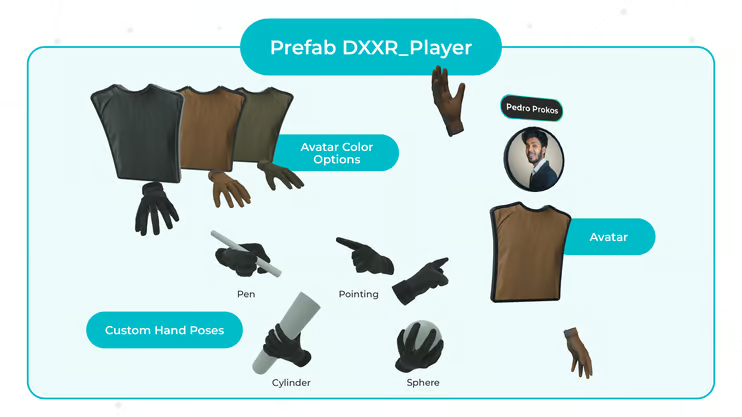
* Avatar displays users name & device on UI above their head
* Avatar's will fade out as they get too close to one another
* Avatar's face will be the users profile photo
* Avatar's hands will animate based on device input (Grip/Trigger/Trigger Touch/Thumbstick/Thumbstick touch)
* Hands have some unique poses based on grabbing objects with specific tags
* RoundGrabbable/LCylinderGrabbable/SCylinderGrabbable/WritingGrabbable
* Tags will be automatically added to project when package is imported
* Hands have a Wrist gameObject attached to them that will spawn any "Watch" prefab located in Resources named "MOTARXR\_LefthandWatch" or "MOTARXR\_RightHandWatch"
* Supports both Built-In and URP render pipelines
* Toolbar button to convert from one to the other will be automatically added on package install
* Sample that contains MultiplayerTest
* A fully put together example utilizing all the features for users to try
## XR Player
* Avatar displays users name & device on UI above their head
* Avatar's will fade out as they get too close to one another
* Avatar's face will be the users profile photo
* Avatar's hands will animate based on device input (Grip/Trigger/Trigger Touch/Thumbstick/Thumbstick touch)
* Hands have some unique poses based on grabbing objects with specific tags
* RoundGrabbable/LCylinderGrabbable/SCylinderGrabbable/WritingGrabbable
* Tags will be automatically added to project when package is imported
* Hands have a Wrist gameObject attached to them that will spawn any "Watch" prefab located in Resources named "MOTARXR\_LefthandWatch" or "MOTARXR\_RightHandWatch"
* Supports both Built-In and URP render pipelines
* Toolbar button to convert from one to the other will be automatically added on package install
* Sample that contains MultiplayerTest
* A fully put together example utilizing all the features for users to try