# Iconology

## How to Access the Icon Legend

{% hint style="info" %}
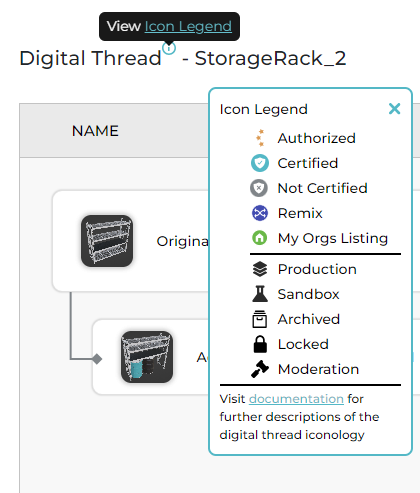
The Icon Legend can be accessed from the Info icon above the Version Tree in Hub or in Studio or above the Listing Name on the Digital Thread tab when editing a listing.
{% endhint %}

**Click** the "Info" icon then **Click** on the "Icon Legend" link. This will open the Icon Legend modal. From here the user will be able to **Click** the "Documentation" link to be directed to a more detailed description of the Digital Thread icons in the MOTAR Public Documents.

<figure><img src="https://540871446-files.gitbook.io/~/files/v0/b/gitbook-x-prod.appspot.com/o/spaces%2FVJV84grXWXSLppsAzVKx%2Fuploads%2FZlQ4t1ho0MvSvIjEDbPt%2Fimage.png?alt=media&#x26;token=95b45993-89fa-41a2-aead-a65bdfd9cb0c" alt=""><figcaption></figcaption></figure>

{% hint style="info" %}
The icon legend pop-up can be moved around and stay on the screen until closed.
{% endhint %}

The user can close the Icon Legend modal by **Clicking** the "X" button located at the top right of the modal.

Icon Types

<table><thead><tr><th width="107" align="center">Icon</th><th>Description</th><th data-hidden></th></tr></thead><tbody><tr><td align="center"><img src="https://540871446-files.gitbook.io/~/files/v0/b/gitbook-x-prod.appspot.com/o/spaces%2FVJV84grXWXSLppsAzVKx%2Fuploads%2FfFEY0r6RkD3eC0QJVa6g%2FAuthorized.png?alt=media&#x26;token=1b7e0317-b1c6-4d58-b737-81b5a6471bcd" alt="" data-size="original"></td><td><p><strong>Authorized -</strong></p><p>A listing that has been marked as the Authoritative Version.</p></td><td></td></tr><tr><td align="center"><img src="https://540871446-files.gitbook.io/~/files/v0/b/gitbook-x-prod.appspot.com/o/spaces%2FVJV84grXWXSLppsAzVKx%2Fuploads%2Fw9VTRIqIRl3pPisv3Iuj%2FCertified.png?alt=media&#x26;token=3b966e65-8a33-4e31-a9b2-392664440546" alt="" data-size="original"></td><td><p><strong>Certified -</strong></p><p>A listing that has been marked as Certified to be used as a part of training content.</p></td><td></td></tr><tr><td align="center"><img src="https://540871446-files.gitbook.io/~/files/v0/b/gitbook-x-prod.appspot.com/o/spaces%2FVJV84grXWXSLppsAzVKx%2Fuploads%2F43kru2CbhEzbGrC4ZAQU%2FNot%20Certified.png?alt=media&#x26;token=6c686386-6674-49a7-8114-6bef60363fe0" alt="" data-size="original"></td><td><p><strong>Not Certified -</strong></p><p>A listing that has not yet been marked as Certified to be used as a part of training content.</p></td><td></td></tr><tr><td align="center"><img src="https://540871446-files.gitbook.io/~/files/v0/b/gitbook-x-prod.appspot.com/o/spaces%2FVJV84grXWXSLppsAzVKx%2Fuploads%2FrKFNvMAC61tyAjT7F20z%2FRemix.png?alt=media&#x26;token=2bfdc38d-e860-42ca-9ab9-4865d9c49da9" alt="" data-size="original"></td><td><p><strong>Remix -</strong> </p><p>A listing that is made up of assets from different parts of the Version Tree, combined to create an entirely new asset. </p></td><td></td></tr><tr><td align="center"><img src="https://540871446-files.gitbook.io/~/files/v0/b/gitbook-x-prod.appspot.com/o/spaces%2FVJV84grXWXSLppsAzVKx%2Fuploads%2FEw5PGNRLduBgNWwNQSlA%2FMy%20Org%20Listing.png?alt=media&#x26;token=99b1672f-bd02-4d85-8e45-08a7b4ed7c82" alt="" data-size="original"></td><td><strong>My Org Listing -</strong> <br>A listing that was created in the Studio Org(s) the user belongs to.</td><td></td></tr></tbody></table>

### Status Types

<table><thead><tr><th width="100" align="center">Icon</th><th>Description</th><th data-hidden></th></tr></thead><tbody><tr><td align="center"><div><figure><img src="https://540871446-files.gitbook.io/~/files/v0/b/gitbook-x-prod.appspot.com/o/spaces%2FVJV84grXWXSLppsAzVKx%2Fuploads%2F2XnstE3b5gb2Ues2o9K6%2Fimage.png?alt=media&#x26;token=e6651dd9-47cf-48ed-88cb-a33fd7cee4d2" alt=""><figcaption></figcaption></figure></div></td><td><strong>Production -</strong> <br>A listing that has been promoted from Sandbox mode to Production.</td><td></td></tr><tr><td align="center"><div><figure><img src="https://540871446-files.gitbook.io/~/files/v0/b/gitbook-x-prod.appspot.com/o/spaces%2FVJV84grXWXSLppsAzVKx%2Fuploads%2F9sfliy9LZuxN20394JZx%2Fimage.png?alt=media&#x26;token=73a48958-e7d6-4c85-8f9d-2e83055a2f71" alt=""><figcaption></figcaption></figure></div></td><td><strong>Sandbox -</strong><br>A listing that exists only in Sandbox mode. </td><td></td></tr><tr><td align="center"><div><figure><img src="https://540871446-files.gitbook.io/~/files/v0/b/gitbook-x-prod.appspot.com/o/spaces%2FVJV84grXWXSLppsAzVKx%2Fuploads%2Fx0tkt9fBjdr6YPjO4Xp1%2Fimage.png?alt=media&#x26;token=8fb257d9-ffc6-4e0d-bca8-8c2aaae710d8" alt=""><figcaption></figcaption></figure></div></td><td><strong>Archived -</strong><br>A listing that has been archived.</td><td></td></tr><tr><td align="center"><div><figure><img src="https://540871446-files.gitbook.io/~/files/v0/b/gitbook-x-prod.appspot.com/o/spaces%2FVJV84grXWXSLppsAzVKx%2Fuploads%2FJdTFg5OmsMOcWeCKk5XK%2Fimage.png?alt=media&#x26;token=b32dc1ed-2e76-4fd1-b7d3-6c55d7cf2c92" alt=""><figcaption></figcaption></figure></div></td><td><strong>Locked -</strong><br>The current user does not have permissions to view the listing.</td><td></td></tr><tr><td align="center"><div><figure><img src="https://540871446-files.gitbook.io/~/files/v0/b/gitbook-x-prod.appspot.com/o/spaces%2FVJV84grXWXSLppsAzVKx%2Fuploads%2FhQ1VFd6CX4U0NNUB8Ft0%2Fimage.png?alt=media&#x26;token=8f1f5f40-07c2-4d0c-b16c-cd5db8cd0fcd" alt=""><figcaption></figcaption></figure></div></td><td><em><strong>Moderation -</strong></em><br><em>A listing that is under moderation. (coming soon)</em></td><td></td></tr></tbody></table>


---

# Agent Instructions: Querying This Documentation

If you need additional information that is not directly available in this page, you can query the documentation dynamically by asking a question.

Perform an HTTP GET request on the current page URL with the `ask` query parameter:

```
GET https://docs.motar.com/motar-core-services/intro-to-core-services/studio/digital-thread/iconology.md?ask=<question>
```

The question should be specific, self-contained, and written in natural language.
The response will contain a direct answer to the question and relevant excerpts and sources from the documentation.

Use this mechanism when the answer is not explicitly present in the current page, you need clarification or additional context, or you want to retrieve related documentation sections.